User         contributions   
This time we have got a texture tutorial from Dan Silverman, so I'd better let him speak: 
  

The Importance of Textures - Lesson #1 
By Dan Silverman 

When creating real-time 3D (RT3D) content we face certain limitations, especially when it comes to geometry. Too much detail in our level 
geometry can force a RT3D engine to slow down to a crawl. How do we overcome these limitations? One way is with textures. Textures can add life and detail to what would be an otherwise dull and boring scene. 

This is part one of a four-part lesson on textures. Lesson one discusses the importance of textures overall. Lesson two will detail methods of 
creating seamless textures. Lesson three will concern itself with the whole idea of ornamental textures. Dirt, wear, and tear will be the concepts covered in lesson four. Now, let's consider the importance of textures!  

As I read through the 3DGS Forum I see a lot of posts about FPS (frames per second), build times, and portals. Most of the time people are 
asking how to make them better. How can I get my level to run faster? Why is it taking WED so long to build my level? Often these questions can be answered by looking at the detail of the geometry in a level. If we can cut back on the amount of geometry our level has, then we will see a benefit in FPS, build times, and the number of portals generated. The question might come up, "How do I get rid of geometry without sacrificing the detail of the level?" As stated above, one possible solution is by texturing. 

As an example I created a relatively simple room in WED: 


As you can see, it's not a lot to write home about. Let's see if we can improve it by adding some textures to it: 


Now we are starting to look a little better, but there is still nothing eye-catching about it. What we need to do is consider the level geometry 
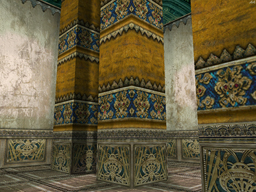
and try to create some textures that will really breath life into this level. Let's see if we can improve it some more: 


Now that's better!  

As you can see, smart texturing can take a dull environment and turn it into one that is pretty exciting. There are a few things to keep in mind when you are creating a level and textures:  

1) Keep in mind the overall style of the level. It would not be a good idea to add brick walls to a spaceship! Sometimes it helps to have a 
reference object like a photo or sketch. I will often look at a lot of images or actually draw a portion of my level before getting involved in 
creating it. 

2) When creating your level, ask yourself, "Do I need this detail in my geometry? Or could I reproduce it with a texture?" For instance, if a 
picture on a wall could not be seen close up by the player, do you really need to build a picture frame out of geometry? Could a texture do 
just as well ... maybe even better? 

3) Sometimes it helps to create your textures first before creating level geometry. Often I will change my geometry based on a texture I've 
created just so everything works together perfectly. One reason I like to do this is because I can apply my textures to geometry in WED as I go and get a good idea just what my level will look like once compiled. 

Well, I hope you can see that proper texturing is very important. The next few lessons should help you in creating your own awesome textures to improve your levels. 

  
Thank you for contributing, Dan; we're looking forward to seeing the rest of the lessons!